Inkstone Local Image-Push Firmware
Inkstone-firmware is RockBase-iot's self-developed, fully local image-push firmware for its e-ink device family (ESP32 platform). Zero installation, no cloud required: once the device is on your network, open http://inkstone.local in a browser, then pick an image → crop → preview → push to the panel. AI agents and scripts can push images directly through an authenticated HTTP API.
- Firmware repository: RockBase-iot/Inkstone-firmware (Chinese README available as
README_zh.md) - Stack: PlatformIO + pioarduino 54.x (arduino-esp32 3.1 + IDF 5.3), aligned with the NM-EPD-420 factory firmware
- Hardware: NM-EPD-420 — currently the
NM-EPD-420-4Cvariant (4.2" four-color e-ink dev board)
Features
- Fully local workflow: the device self-hosts an upload page (STA
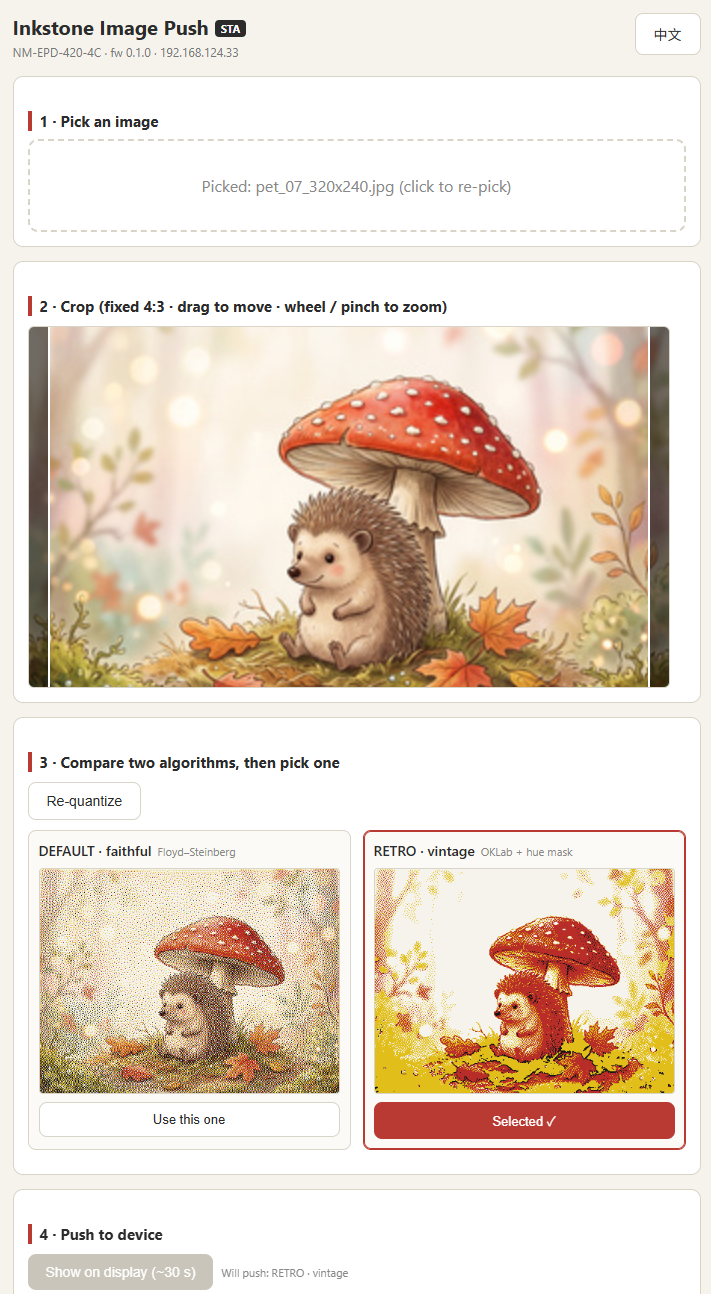
inkstone.localor AP192.168.4.1); the picked frame is quantized in the browser and sent as a raw 2bpp bitstream written straight to the panel - Dual quantization preview: the page renders the image under two algorithms side by side —
default(luma-weighted Floyd–Steinberg) andretro(OKLab + panel-calibrated warm palette + hue-aware masking, added in v0.1.1) — and you pick one to push - Bilingual web UI: English / 中文, defaults to English
- Authenticated HTTP API:
/api/v1/*endpoints with Bearer token auth, raw / JPEG / PNG channels and?profile=default|retro|noneselection, so AI tools and scripts can push images directly - Refresh-rate protection: 60 s minimum interval during debugging (600 s recommended for production), plus windowed deep sleep
- Open mode for trusted networks:
POST /api/v1/auth {"open":true}disables the token on home LANs - Multi-board framework: all board-level constants live in
src/boards/*.h; seedocs/PORTING.mdin the repository to add a board (only NM-EPD-420-4C is supported today) - Easy access: after Wi-Fi provisioning, open
inkstone.localwithout looking up the device IP; the setup hotspot isInkstone-XXXXXXto distinguish devices
Two Quantization Profiles
Neither is strictly better — they optimise different things, which is exactly why the page shows both side by side.
default | retro | |
|---|---|---|
| Goal | fidelity | stylised, film-like grain |
| Cool regions (sky, water) | dithers into red speckle | masked to black + white only |
| Highlights / shadows | can crush to pure white / black | lifted and compressed |
| Good for | warm-toned subjects, general use | images with large cool areas |
Both profiles are byte-identical across the firmware, the browser, and the reference script tools/convert_image.py — the same input frame comes out the same on all three.
Quick Start
- With no stored credentials the device opens the hotspot
Inkstone-XXXXXX(XXXXXX = last three MAC bytes, password12345678); openhttp://192.168.4.1in a browser to configure Wi-Fi - After provisioning, visit
http://inkstone.local, pick an image, crop it, compare the two quantization previews, and push - The API token is shown on the AP-mode page and in the serial log; see
docs/API.mdandtools/push_image.pyin the repository for scripted pushes, or enable open mode to skip the token entirely
Clone the repo and build with PlatformIO: pio run -e nm-epd-420-4c produces a merged inkstone-nm-epd-420-4c.bin; flash with pio run -e nm-epd-420-4c -t upload.