NM-CYD-C5
Overview
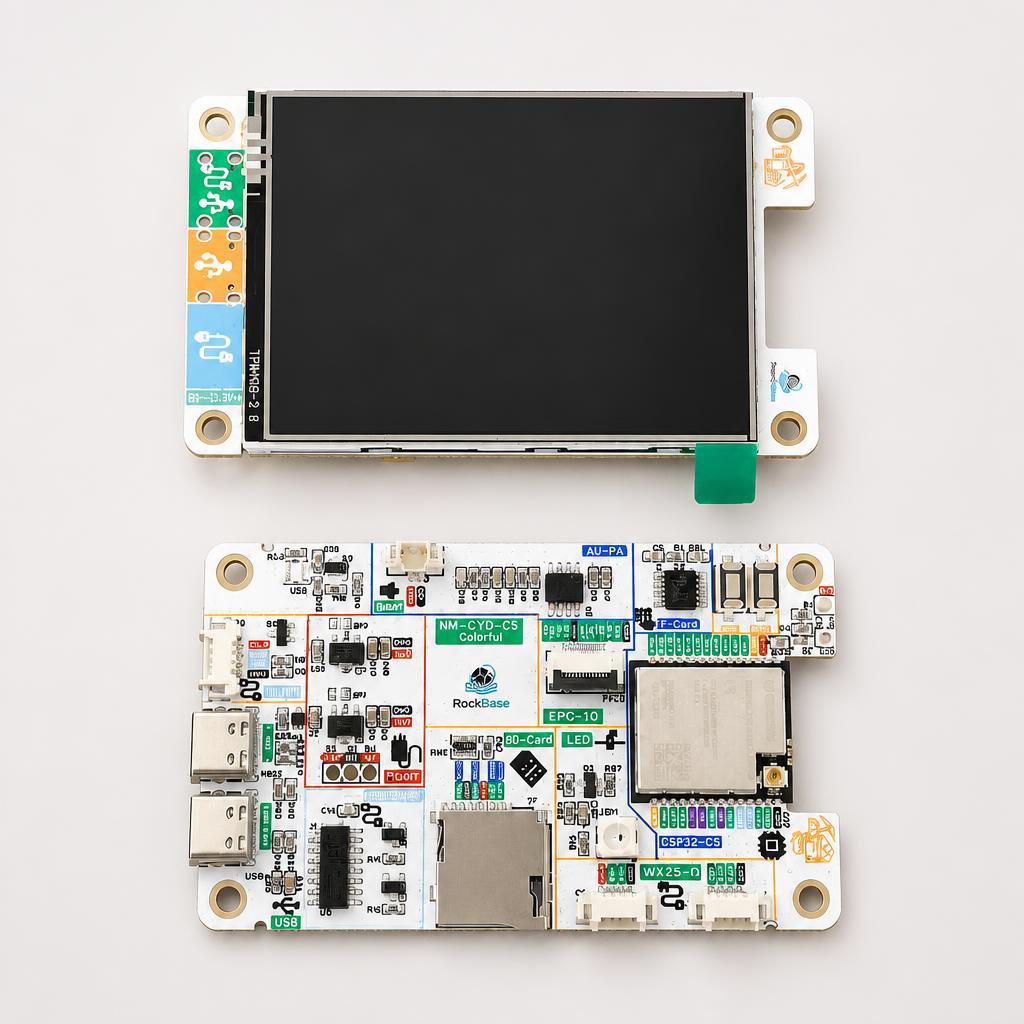
The NM-CYD-C5 is a Cheap Yellow Display development board powered by the ESP32-C5, featuring a built-in 2.8" 320×240 TFT LCD with touch screen. It is fully compatible with the dimensions and interfaces of the ESP32-Cheap-Yellow-Display (CYD), enabling seamless replacement while adding dual-band Wi-Fi 6, BLE 5, Zigbee 3.0, and Thread support.

Features
- ESP32-C5-WROOM-1 — RISC-V 32-bit @ 240 MHz
- 16 MB Flash + 8 MB PSRAM
- 2.8" TFT LCD — 320 × 240, ST7789 driver, capacitive touch screen
- Dual USB-C ports — one for ESP32-C5 programming/power, one CH340 UART
- SD Card Slot + RGB LED + additional GPIO pins
- 12-pin FPC connector for convenient external module connection
- Fully compatible with ESP32-Cheap-Yellow-Display form factor
Wireless Capabilities
| Protocol | Specification |
|---|---|
| Wi-Fi | Dual-band Wi-Fi 6 (802.11ax), 2.4 GHz & 5 GHz |
| Bluetooth | BLE 5.3 + Classic Bluetooth (SPP, HID, GATT) |
| Zigbee | IEEE 802.15.4, Zigbee 3.0 end-device |
| Thread | IPv6-based mesh networking (Thread 1.3) |
Comparison with Standard CYD
| Feature | Standard CYD (ESP32) | NM-CYD-C5 |
|---|---|---|
| Wi-Fi Band | 2.4 GHz | 2.4 + 5 GHz |
| Wi-Fi Standard | 802.11 b/g/n | 802.11ax (Wi-Fi 6) |
| Zigbee | Not supported | Zigbee 3.0 |
| Thread | Not supported | Thread 1.3 |
| Flash | 4 MB | 16 MB |
| PSRAM | None | 8 MB |

Hardware Versions
- NM-CYD-C5 (standard) — on-board antenna, fully compatible with the standard CYD form factor.
- NM-CYD-C5-Colorful-Ant — external-antenna version based on the Colorful special edition. It adds an IPEX 1 connector with a dual-band 2.4 GHz / 5 GHz antenna (peak gain 3.2 / 3.7 dBi AVG) for better Wi-Fi and BLE reception, suitable for users with higher wireless-performance requirements. The enclosure 3MF files are open-sourced in the NM-CYD-C5 repository.
Pinout
SPI Bus (Shared by Display, Touch, and SD Card)
| Device | SCK | MISO | MOSI | CS |
|---|---|---|---|---|
| Display (ST7789) | GPIO 6 | GPIO 2 | GPIO 7 | GPIO 23 |
| Touch (XPT2046) | GPIO 6 | GPIO 2 | GPIO 7 | GPIO 1 |
| SD Card | GPIO 6 | GPIO 2 | GPIO 7 | GPIO 10 |

LP-UART (P5) — GPS Module
| Signal | Pin |
|---|---|
| RX | GPIO 4 |
| TX | GPIO 5 |
I2C Connector (CN1)
| Pin 1 | Pin 2 | Pin 3 | Pin 4 |
|---|---|---|---|
| 3.3V | IO 9 | IO 8 | GND |
Note: IO8 and IO9 are pulled up on the board via R32 and R33 — keep this in mind when connecting external I2C devices.
Extension IO (P1)
| Pin 1 | Pin 2 | Pin 3 | Pin 4 |
|---|---|---|---|
| IO 4 | IO 8 | IO 26 | GND |
12-Pin FPC Connector (FPC2)
| 1 | 2 | 3 | 4 | 5 | 6 | 7 | 8 | 9 | 10 | 11 | 12 |
|---|---|---|---|---|---|---|---|---|---|---|---|
| IO 2 | IO 6 | IO 7 | IO 10 | GND | IO 4 | IO 8 | IO 5 | IO 9 | USB D- | USB D+ | GND |
WS2812 RGB LED & LCD Backlight
| Function | Pin |
|---|---|
| LCD Backlight | GPIO 25 |
| WS2812 RGB LED | GPIO 27 |
Quick Start
PlatformIO (Recommended)
Add the following to your platformio.ini:
[env:nm-cyd-c5]
platform = https://github.com/pioarduino/platform-espressif32/releases/download/55.03.36/platform-espressif32.zip
board = esp32-c5-devkitc-1
framework = arduino
TFT_eSPI Setup
When using TFT_eSPI with the LCD, add the TFT_eSPI_ESP32_C5.c/h files to the Processors folder and update TFT_eSPI.c/h with CONFIG_IDF_TARGET_ESP32C5. These files can be found in the Demos/Arduino/libraries/TFT_eSPI directory of the NM-CYD-C5 repository.
If the colors appear inverted when using Arduino/TFT_eSPI, add the following defines to your TFT_eSPI setup (see issue #3):
#define TFT_INVERSION_OFF
#define TFT_RGB_ORDER TFT_BGR
MicroPython
esptool.py --chip esp32c5 --port COM3 erase_flash
esptool.py --chip esp32c5 --port COM3 --baud 460800 write_flash -z 0x1000 firmware.bin
mpremote connect COM3 repl
Supported Projects
- NMMiner
- Bruce
- HaleHound-CYD
- ESP32Marauder
- Rogue-Radar — handheld firmware combining multiple wireless and utility tools in one rotary-driven interface
- CYM (Cheap Yellow Monster) — portable, touchscreen-driven WiFi security toolkit
- Launcher — application launcher for M5Stack, Lilygo, CYD, Marauder and ESP32 devices
- GhostESP — open-source wireless research platform (NM-CYD-C5 adaptation in progress)
- ESPectre — WiFi CSI motion detection, adapted for the NM-CYD-C5 (see ESPectre × NM-CYD-C5)
- ESP-Claw — Espressif's chat-coding AI agent framework for IoT devices
Projects in Progress

Firmware Flashing
If you just want to flash firmware, try: